Okay,
it's like this. Seems that I would surf the net and watch these clever
animations. Or listen to some music. Some were good enough that I wanted
to keep them around for later amusement.
I figured they must be cached somewhere on the hard drive, but where does
the PC stash these *.mov, *.swf, *.avi, *.mp3, *.mp4, etc. files?
As it turns out, for those played with Internet Explorer, which I confess
I now use most :-(, the directory for this PC, running WinXP,
is
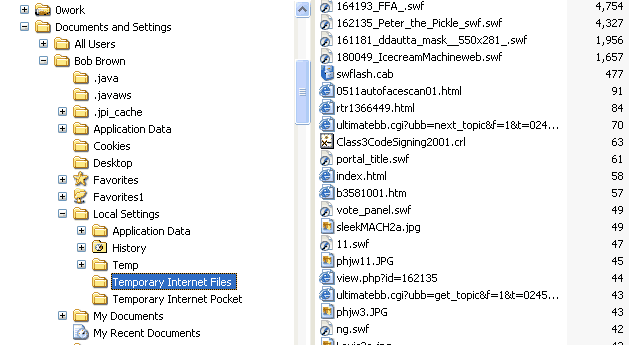
C:\Documents and Settings\Bob Brown\Local Settings\Temporary Internet Files
Unless you are Bob Brown, that part would probably be different for you. It might be your name, or maybe "Administrator".
Anyway, I created a new directory under Local Settings called Temporary Internet Pocket (see the screen capture below).
This
shows up just under the Temporary Internet Files directory, so it's easy
to copy files from there and drop them into the Pocket for further use.
Also note that if you try to play the files directly from the Temporary
Internet Files directory, you get a warning. But if you copy (or move)
them to the Pocket, you can play them, no problem.
You can find the animations or movies by clicking on Size or Type in the bar above all the filenames. This forces a sort. Animations are usually among the larger files, so clicking Size twice brings them to the top. Or sort by type, and look for the mov, swf, avi, mp3, mp4, or whathaveyou files. Enjoy.